Quick start
Install Sundial on your Mac, make your first edit with an agent, and open the folder you already have.
What Sundial is
Sundial is an editor where you and your agents write in the same document. Markdown, LaTeX with a live PDF, code.
 Your files are plain files on your disk. Any other tool keeps working on them.
 Your agent can be the
  Claude Code or
  Codex you already pay for, running on your Mac and talking to Anthropic or OpenAI directly, so Sundial never sees those chats. Or an Ollama model that never leaves your computer, or
  Sundial Agent in the cloud.
 Every edit an agent makes is attributed to it and arrives as a suggestion you accept or reject.
 Your text leaves your machine in three cases: you share it, you use Sundial Agent, or you use inline AI.
A terminal agent edits files in place. In Sundial the same agent's edits arrive as suggestions, attributed, with history per edit.
Install in a minute, no account
Download Sundial for macOS, 13.5 or later, and open it. The web app works in any browser.
If Claude Code or Codex is installed, Sundial finds it and uses it as the default agent. Nothing to configure and no API key. If neither is installed, the chat answers Sign in to chat with Sunny: sign in and chats run on Sundial Agent, which the app also calls Sunny.
The desktop app needs no account and no plan. Claude Code and Codex run on your own plan; Sundial never bills for them. Sundial Agent, inline AI and autocomplete spend Sundial credits; a new account starts with free credits and is topped up every month.
Make your first edit with an agent
Press New project, then Blank project. It opens welcome.md, which contains this sentence:
the quick brwn fox jumps over lazy dog
- Highlight the sentence above and press
Cmd+Alt+Mto comment on it. - Write "@Agent fix the grammar" and post the comment.
- The Agent answers on your thread, and its fix lands as a suggestion you accept or reject.
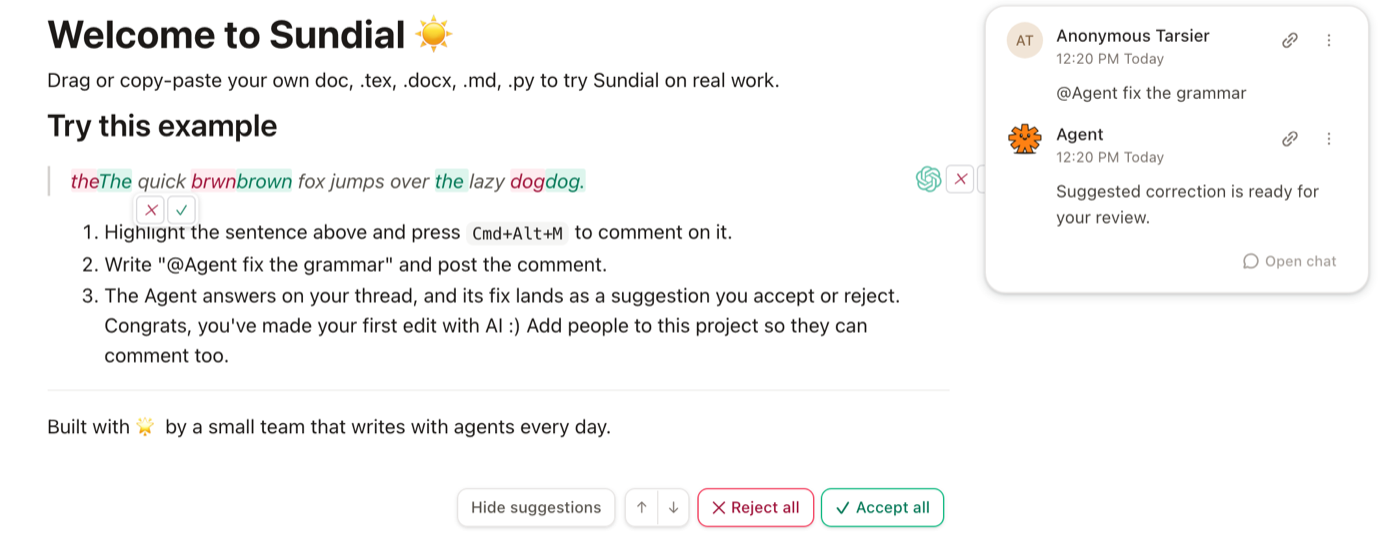
For bigger asks, Cmd+Shift+J opens a chat beside the document and Cmd+J adds a selection to it; its edits arrive the same way. Suggest is the default for every chat, so nothing becomes final text without you.
Open the folder you already have
Press New project and pick Open folder, Clone from GitHub, Blank project, or a template.
- Markdown. Wikilinks like
[[note]], footnotes, tags, and frontmatter, so an Obsidian vault opens as-is. - LaTeX. The source beside a live PDF, compiled on your machine.
Edits are written back to the same plain files.
Share when you are ready
Sign in and share a file, a folder, or the whole project. What you share syncs live through Sundial's cloud; everything else stays on your machine. Stop sharing and you are fully local again. Sign in also to use Sundial Agent, or to open a workspace at sundial.md in a browser with no install.
That is the whole loop: write, ask, review.